What Is IPTV and How Does It Work?

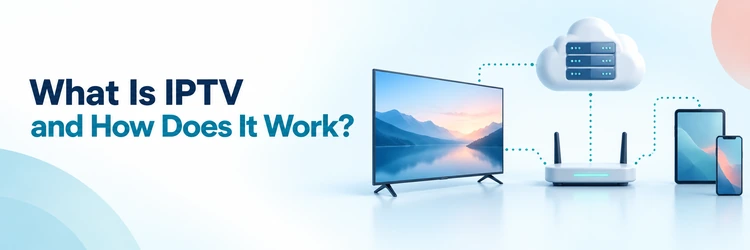
Key Takeaway: IPTV, or Internet Protocol television, delivers video as data over an IP network instead of sending every channel through a cable or satellite signal. The technology is legitimate; providers need permission to distribute lawful content in each market served.
People often use “IPTV” for anything watched through an internet connection, but the term has a narrower technical meaning. Traditional operator IPTV commonly runs on a managed network, while familiar streaming apps often travel across the public internet. I will separate the technology, service, player, and content rights so those distinctions stay clear.
This guide follows a television program from its source to your screen, then explains live channels, time-shifted viewing, video on demand, devices, bandwidth, buffering, security, and legality. You will also see why an M3U playlist is not a subscription, why an app may supply no channels, and which warning signs deserve attention before payment.
Disclaimer
This article provides general technical, consumer, privacy, and lawful-use information rather than legal, cybersecurity, or purchasing advice. No sponsored placement was supplied. Services, apps, standards, prices, menus, channel rights, and regional availability can change after October 15, 2026. Use licensed services and content you are authorized to watch; a player, playlist format, proxy, or VPN does not create distribution or viewing rights. Confirm current terms with the provider and seek local professional advice when a legal question matters.
Read More
Why You Can Trust OTTWatchGuide?
OTTWatchGuide reviewed current material from the International Telecommunication Union, Apple, MPEG, Amazon Web Services, Google, Netflix, the U.S. Copyright Office, and the Federal Trade Commission. The explanation distinguishes standards from marketing shorthand and licensed services from unauthorized sources. It does not claim hands-on testing, measured performance, legal clearance, or identical behavior across every provider, device, network, and country.
- Primary Standards: Technical definitions and delivery behavior come from standards bodies and platform documentation.
- Consumer Checks: Speed, billing, app, privacy, and device claims are treated as provider-specific.
- Legal Boundary: Delivery technology is separated from the rights attached to channels and programs.
- Evidence Limit: No unperformed subscription, playback, or support test is presented as experience.
What Is IPTV?
IPTV means Internet Protocol television. The International Telecommunication Union defines it as multimedia services delivered over IP-based networks managed to support quality, security, interactivity, and reliability. In plain language, television becomes network data. The receiving device uses the same Internet Protocol family that moves web pages, messages, and other traffic, then reconstructs synchronized video and audio.
The word describes a delivery method, not a company, app, channel bundle, or legal status. A licensed telephone-company TV package can use IPTV. So can a hotel television system, a university network, or a broadcaster’s authenticated service. An unauthorized seller may also misuse the label, which is why “IPTV” alone reveals nothing about content rights.
Everyday consumer usage is broader than the formal definition. People routinely call public-internet live-TV services, subscription streaming apps, and playlist-based services IPTV even when engineers would classify some as over-the-top, or OTT, video. The practical overlap is real: both can use apps, internet-connected devices, segmented video, adaptive quality, account authentication, and remote servers to deliver programs.
| IPTV layer | Main job | What the viewer should check |
|---|---|---|
| Content source | Supplies a live feed or stored program | Does the service have distribution rights in your location? |
| Encoder and packager | Compresses video and creates compatible streams | Are resolution, captions, audio tracks, and codecs supported? |
| Service platform | Handles channels, accounts, guides, security, and playback rules | Is the operator identifiable, transparent, and reachable? |
| IP network or CDN | Moves stream data toward the household | Is capacity stable during the times you actually watch? |
| Player or set-top box | Requests, buffers, decodes, and displays the program | Does it support the service, device, and required format? |
How Does IPTV Work?
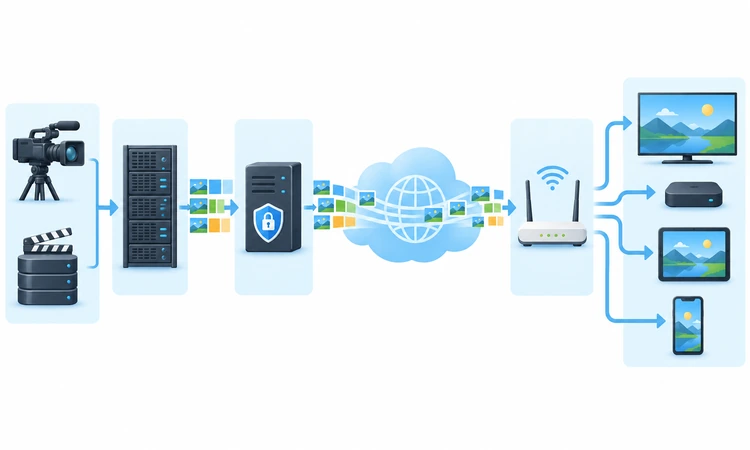
An IPTV stream passes through several systems before a picture appears. The exact architecture differs between a managed operator network and a public-internet app, but the basic path remains recognizable. A source is captured, compressed, organized for delivery, protected when necessary, transported across a network, requested by a player, buffered briefly, decoded, and sent to the screen.
Step 1: A Provider Acquires the Program
The starting point may be a live studio feed, sports venue, broadcast channel, or stored movie file. A legitimate provider obtains the permissions needed to distribute that material to particular audiences and territories. Technical access is not the same as permission. A working stream can still be unauthorized, geo-restricted, or outside the seller’s contractual rights.
Step 2: The Video Is Encoded and Packaged
Raw production video is far too large for ordinary household delivery, so encoders compress it with a video codec and pair it with audio, captions, and metadata. Packagers then organize the result into formats a player understands. Apple’s HLS and MPEG-DASH commonly divide programs into short segments and use a manifest or playlist to describe their order.
Step 3: Servers and Networks Distribute It
The packaged stream moves to an origin server and often a content delivery network, or CDN, that caches copies closer to viewers. Public-internet services usually send a separate unicast session toward each viewer. Managed IPTV networks may use multicast for popular live channels, allowing network equipment to deliver one shared stream efficiently to many subscribed homes.
Step 4: Your App Requests the Stream
After sign-in, the service checks the account, entitlement, location, device, and connection limits. The app or set-top box reads the manifest, requests the next media segments, and may obtain a content-protection license. An electronic program guide is separate metadata: it tells the interface what is on, but it does not carry the video itself.
Step 5: The Player Buffers and Decodes It
The player holds a small amount of upcoming video in a buffer, decodes compressed audio and video, and sends them to the display. Adaptive bitrate playback can switch among prepared quality levels as available bandwidth changes. More buffering can absorb brief network variation, while lower-latency live modes reduce delay but leave less protection against interruptions.
The Main Types of IPTV
IPTV is not limited to a grid of live channels. The same account may combine scheduled television, restart or catch-up features, and a selectable library. These experiences differ mainly in when the program is prepared, how long it remains available, and how much control the viewer has over timing. Provider rights and regional catalogs still govern every category.
| IPTV type | How viewing works | Common limitation |
|---|---|---|
| Live or linear TV | A scheduled channel plays continuously in real time | Delay, blackouts, and restart controls vary by event and provider |
| Time-shifted or catch-up TV | Previously aired programs remain available for a limited window | Not every channel or program permits replay |
| Start-over TV | A current program restarts from its beginning | Availability may depend on channel rights and device support |
| Video on demand | The viewer selects a stored movie, episode, or clip | Catalog titles can rotate or require an extra payment |
| Near video on demand | The same program starts on several scheduled channels | Less flexible than true on-demand playback |
Video on demand behaves more like requesting a file in ordered pieces. The viewer can normally pause, seek, and resume because the full asset already exists. Catch-up and start-over sit between live and on-demand operation: the service records or retains permitted programming, then exposes a controlled playback window rather than making the title permanently available.
IPTV vs. Cable, Satellite, and OTT Streaming
Cable, satellite, IPTV, and OTT services can look similar once their menus appear on a television. The difference lies behind the interface. Cable traditionally uses a coaxial access network, satellite broadcasts from orbit to a dish, managed IPTV uses an operator-controlled IP network, and OTT apps deliver video over a general internet connection supplied independently of the video service.
| Delivery option | Typical path | Main tradeoff |
|---|---|---|
| Cable TV | Provider headend through a cable access network | Stable household delivery, but equipment and location can be restrictive |
| Satellite TV | Satellite broadcast to an outdoor dish and receiver | Wide geographic reach, but installation and severe weather can matter |
| Managed IPTV | Operator network to an authenticated gateway or set-top box | Quality controls are possible, but service may be tied to one broadband operator |
| OTT streaming | App through the public internet to many supported devices | Flexible access, but performance depends on the wider internet and home network |
| Antenna TV | Local terrestrial broadcast to a tuner and antenna | No streaming subscription, but reception and channel choice depend on location |
Marketing blurs these boundaries. A broadband company may bundle managed live television with OTT apps inside one set-top box. A virtual live-TV service may resemble cable while using public-internet streaming. The useful questions are not merely “Is it IPTV?” but who operates the service, how it reaches your device, what it includes, where it works, and who controls billing.
What Do You Need to Watch IPTV?
The minimum setup is a lawful service, a compatible player or provider app, an internet or managed-network connection, and a device that can decode the chosen stream. That device may be a smart TV, streaming stick, set-top box, phone, tablet, computer, or game console. Compatibility must be confirmed for the exact operating system and region.
Some services provide both the content and their own app. Others supply account credentials for a compatible third-party player. A player is only playback software; it may contain no channels, movies, or subscription rights. Likewise, an M3U or M3U8 file is a playlist format that points to media locations. The file itself does not establish ownership or legality.
Before subscribing, confirm the supported app store, installation route, screen limit, household policy, travel rules, video quality, captions, audio languages, accessibility, program guide, replay window, cancellation process, and refund terms. Ask whether “devices” means registered installations or simultaneous streams. These are different limits, and exceeding a concurrency rule can stop playback even when the app remains installed.
How Much Internet Speed Does IPTV Need?
There is no universal IPTV speed requirement because codecs, frame rates, resolution, compression, live latency, and provider design differ. As reference points, Netflix currently recommends at least 5 Mbps for 1080p and 15 Mbps for 4K, while YouTube lists about 5 Mbps for 1080p and 20 Mbps for 4K. Treat those figures as service-specific baselines.
Add capacity for every simultaneous stream and other household activity, then leave headroom for Wi-Fi variation. Two 4K streams can need materially more than one, while cloud backups, video calls, game downloads, and security cameras compete for the same connection. Advertised broadband speed is not a guarantee that the viewing device receives that rate steadily at the television.
| Viewing situation | Practical network check | Why it matters |
|---|---|---|
| One HD stream | Test sustained speed at the viewing device, not beside the router | Wi-Fi distance and interference can reduce usable throughput |
| One 4K stream | Confirm the service, device, port, display, and plan all support 4K | Extra speed cannot create a resolution the source does not offer |
| Several viewers | Add expected simultaneous streams and reserve household headroom | Each unicast stream consumes additional downstream capacity |
| Live sports | Favor stable Ethernet or strong Wi-Fi and a normal latency setting | Ultra-low delay generally provides less buffering protection |
| Mobile connection | Check signal quality, plan throttling, and data allowance | Video can consume substantial data and change quality automatically |
Speed tests measure one moment and may choose a nearby test server, while the video may come from another route. Stability, packet loss, congestion, router placement, device processing, and provider capacity also affect playback. I treat a steady connection at the actual screen as more useful evidence than a large headline number measured elsewhere in the home.
Why IPTV Buffers or Looks Blurry
Buffering means the player has consumed stored video faster than replacement segments arrive. A slow broadband plan can cause that, but so can weak Wi-Fi, interference, a crowded router, packet loss, provider overload, a distant server, an outdated app, limited device memory, or a high-quality stream the device cannot decode smoothly. The visible symptom does not identify one cause.
Start by checking whether the problem affects one channel, one app, one device, or every internet activity. That simple split narrows the fault domain. A single failing channel points toward the source or provider. Several apps failing on one television suggest the device or its connection. Every device slowing together suggests the router, broadband service, or household congestion.
| Symptom | Likely boundary | Safe first action |
|---|---|---|
| One channel repeatedly stops | Source feed, channel server, or provider packaging | Try another authorized channel and report the exact time to the provider |
| Every channel fails in one app | Account, entitlement, app, playlist, or provider outage | Restart the app and check the provider’s official status or support route |
| All apps buffer on one TV | Weak Wi-Fi, device load, update, or storage problem | Restart the device, update it, and test Ethernet or a closer router position |
| All household streaming slows | Broadband congestion, router, or ISP fault | Pause large transfers, restart network equipment, and test more than once |
| Picture drops to lower quality | Adaptive playback detects reduced usable bandwidth | Keep automatic quality or select a sustainable resolution |
| Audio and video drift | Decoder load, damaged segments, or app fault | Restart playback, update the app, and compare another supported device |
Avoid deleting data, reinstalling unknown software, changing DNS, sideloading replacement apps, or buying a VPN as the first reaction. Those steps may not address the cause and can introduce new risks. Use official app stores and support pages, preserve account details, and make one reversible change at a time so the result actually identifies what helped.
Is IPTV Legal and Safe?
IPTV technology is legal. Legality depends on whether the service has permission to distribute the channels, events, movies, and programs it sells in the relevant territory. Licensed services can use IPTV, cable, satellite, broadcast, or OTT delivery. An attractive interface, working stream, app-store presence, or payment receipt does not by itself prove the underlying content rights.
Warning signs include an implausibly large premium catalog for a tiny fee, anonymous ownership, cryptocurrency-only payment, instructions to disable security protections, unofficial sideloading, copied branding, no verifiable terms, and claims that a VPN makes any stream legal. The Federal Trade Commission also warns that pirate streaming apps and add-ons can carry malware capable of stealing credentials and payment information.
Prefer providers that identify the operating company, explain service regions, publish usable terms and privacy information, offer ordinary payment protections, and distribute apps through recognized channels. For a practical comparison of rights-focused services, see OTTWatchGuide’s legal IPTV provider guide. Availability still needs confirmation for your country and desired channels.
Privacy, Security, and Account Checks
An IPTV service can observe account details, device identifiers, IP addresses, viewing activity, search behavior, diagnostics, and payment information according to its design and privacy policy. A third-party player may process separate analytics or crash data. Review both parties rather than assuming the subscription provider and playback app are one organization with one set of practices.
Use a unique password, enable multifactor authentication when offered, and download apps only from the provider’s verified page or an official app store. Keep the operating system, router, app, and player updated. Do not share portal URLs, playlist links, activation codes, MAC addresses, or account credentials publicly; some of these values can grant access or expose the account.
How IPTV Billing and Subscriptions Work
Billing depends on the operator. A broadband provider may combine television, equipment, and internet on one invoice. An OTT live-TV service may bill monthly through its website or an app store. A third-party player can charge separately from the channel service. Hardware, installation, premium events, extra screens, rentals, and regional taxes may create additional costs beyond the advertised plan.
Verdict
IPTV works by turning television into compressed network data, organizing it into streams, delivering it across an IP network, and decoding it in an app or set-top box. The viewer gains flexible live, replay, and on-demand options, but quality depends on the whole path. Choose identifiable, licensed providers, confirm device and connection limits, and troubleshoot methodically.
- International Telecommunication Union: Use the standards-based definition to separate IPTV technology from a seller, playlist, channel bundle, or claim of legality.
- Check Rights and Terms: Confirm regional availability, channel permissions, renewal, cancellation, privacy, and simultaneous-stream limits through verifiable provider information before paying.
- Test the Real Connection: Measure stability where the screen is located, leave capacity for other household activity, and prefer reversible buffering fixes.
FAQs
What does IPTV stand for?
IPTV stands for Internet Protocol television. It describes television and related media delivered as packets over an IP-based network. The label does not name one provider or guarantee that a service is licensed. Managed operator television and public-internet streaming can share similar technology, although engineers may classify their network arrangements differently.
Is IPTV the same as Netflix?
Netflix is an on-demand streaming service that uses internet delivery, but it is not usually described as a traditional managed IPTV service. In everyday speech, people may group both because each uses apps and IP networks. Traditional IPTV often emphasizes managed live channels, set-top boxes, operator control, and multicast alongside on-demand viewing.
Is IPTV legal in the United States?
The technology is legal in the United States. A particular service may be lawful or unlawful depending on its rights to distribute specific programming and the way it operates. A low price, large catalog, working app, or seller assurance is not proof. Use identifiable licensed providers and seek legal advice for a specific dispute.
Is a special box required for IPTV?
Not always. Many licensed services run directly on supported smart TVs, streaming sticks, phones, tablets, computers, and game consoles. A provider may require its own set-top box for a managed network or supply an app instead. Confirm the exact model, operating system, app store, region, codec support, and account limit before subscribing.
Does an IPTV player include channels?
Usually, a standalone IPTV player supplies only playback and guide features. It needs a lawful service, account, playlist, or portal configured separately. Some provider-owned apps combine the player and subscription, which creates confusion. Read the product description carefully so you know whether a payment covers software, content access, or both.
What is an M3U IPTV playlist?
M3U is a text-based playlist format containing references to media locations. M3U8 commonly indicates the UTF-8 form and is also associated with HLS playlists. A playlist can organize lawful streams, but its format proves nothing about rights. Protect private playlist URLs because anyone possessing one may be able to access the associated account.
What is an IPTV electronic program guide?
An electronic program guide, or EPG, supplies schedule metadata such as channel names, program titles, descriptions, start times, and end times. It helps the player display a television grid but does not carry the actual video. Missing or incorrect listings can result from stale data, time-zone settings, channel mapping, or provider problems.
How much internet speed is enough for IPTV?
Requirements vary by service, codec, quality, and concurrent use. As broad reference points, major platforms recommend roughly 5 Mbps for one 1080p stream and 15–20 Mbps for one 4K stream. Leave headroom for Wi-Fi variation and other devices. Test sustained performance at the screen rather than relying only on the plan’s advertised maximum.
Why is live IPTV delayed?
Live video must be captured, encoded, packaged, transported, buffered, decoded, and displayed. Every stage adds time. Lower-latency modes shorten the buffer but can increase interruptions when conditions vary. Satellite, cable, radio, alerts, and nearby viewers may follow different paths, so their timing will not necessarily match the internet stream.
Can IPTV work without internet?
Public-internet IPTV and streaming apps need a network connection for playback, sign-in, guide updates, and licenses. A managed operator service also uses an IP network, even if traffic stays within the provider’s infrastructure rather than the wider internet. Previously downloaded programs may work offline only when the service explicitly supports downloads and valid offline licenses.
Does a VPN stop IPTV buffering?
Not reliably. A VPN adds another server and encrypted route, which can reduce or increase performance depending on congestion and routing. It cannot repair weak Wi-Fi, an overloaded provider, limited device hardware, or an undersized broadband plan. A VPN also does not make unauthorized content legal or prove that a seller owns distribution rights.
What causes IPTV channels to freeze?
Common causes include weak Wi-Fi, household congestion, packet loss, router trouble, provider overload, a faulty source feed, outdated software, low device resources, or an unsustainable quality level. Compare another channel, app, device, and connection in that order. The pattern helps identify whether the fault is local or service-side before major changes.
Does IPTV work on multiple devices?
Installation and simultaneous viewing are different permissions. A service may let you install its app on several devices while allowing only one active stream. Others sell household or extra-screen plans. Check registered-device limits, concurrent connections, home-network rules, travel access, and profile behavior. Exceeding the limit can interrupt an otherwise valid session.
How can viewers tell whether an IPTV service is trustworthy?
Look for an identifiable company, verifiable licensing or channel relationships, clear regional availability, ordinary payment protections, current terms, a privacy policy, realistic pricing, and supported apps. Be cautious with anonymous sellers, copied branding, impossible catalogs, sideload-only instructions, irreversible payments, and claims that a VPN removes legal risk. No single badge proves legitimacy.
What should buyers check before buying IPTV?
Confirm the exact channel lineup, your location, supported device, app source, picture quality, captions, audio languages, guide, replay period, simultaneous streams, household policy, full checkout price, renewal, cancellation, refund terms, privacy practices, and customer-support route. I would also check whether the provider clearly and publicly explains its identity and content rights.