9 Best IPTV for Roku (2026)

These quick picks identify a published differentiator and the Roku question that still needs an answer:
Key Takeaway: USA LIVE IPTV publishes a Roku player tutorial; Tellystudio names Roku and offers a one day trial; OrigineTV publishes clear connection tiers. The other candidates require a written Roku setup answer before purchase. None was independently playback tested.
Best IPTV for Roku: Quick Comparison
- USA LIVE IPTV — Provider Roku tutorial; check Ibo Player Pro availability and any separate activation fee in your Store region.
- Tellystudio — Roku named, free trial; ask support for the missing Roku walkthrough before starting its short trial.
- OrigineTV — Clear connection tiers; resolve Roku setup before activation because published refunds are restrictive.
- OSIRISIPTV — Lower listed entry price; its M3U support does not establish a working Roku player route.
- EagleCast TV — Three listed connections; the official FAQ does not identify Roku among its listed devices.
- Sofa IPTV — English market plans; the official site omits Roku and its refund windows conflict.
- GoCheap IPTV — Budget monthly option; request a Roku method and clarify the incomplete refund policy.
- Velino TV — Detailed other-device setup; its detailed setup index covers other devices but omits Roku.
- Magnolia IPTV — Device tier choices; a Roku icon is shown without a verified setup guide.
| Service | Buying angle | Published starting plan | Roku evidence | Visit Site |
|---|---|---|---|---|
| USA LIVE IPTV | Provider Roku tutorial | USD 49.96 / three months | Provider walkthrough | Visit Site |
| Tellystudio | Roku named, free trial | USD 15 / 30 days | Names Roku; setup unverified | Visit Site |
| OrigineTV | Clear connection tiers | EUR 34.99 / three months | Specific setup unverified | Visit Site |
| OSIRISIPTV | Lower listed entry price | EUR 9.99 / month | Specific setup unverified | Visit Site |
| EagleCast TV | Three listed connections | USD 14.99 / month | Specific setup unverified | Visit Site |
| Sofa IPTV | English market plans | USD 13 / month | Specific setup unverified | Visit Site |
| GoCheap IPTV | Budget monthly option | USD 12 / month | Specific setup unverified | Visit Site |
| Velino TV | Detailed other-device setup | Not publicly listed on the official site | Specific setup unverified | Visit Site |
| Magnolia IPTV | Device tier choices | USD 13 / month | Specific setup unverified | Visit Site |
Disclaimer
This article compares provider published information, not verified streaming performance or channel licensing. IPTV is a delivery method; its use is lawful only when the provider has rights to distribute the content in your location. We may earn commission from commercial links. Device support, prices, refunds, and app availability change. Confirm every claim and the applicable terms directly before purchase.
Finding the best IPTV for Roku starts with the installation route, not a channel count. A content subscription and a Roku Store player are separate purchases. A provider may claim support without publishing which app accepts its credentials in your country. Check the exact model and player availability before deciding.
I reviewed nine active service offers, official device pages, published prices, and policy text. Only one provider supplied a concrete Roku walkthrough in the material examined. This ranking is a buying shortlist with explicit compatibility gaps, not a performance benchmark. Test authorized channels and playback on your Roku before paying.
Read More
Why You Can Trust OTTWatchGuide?
We checked the approved destination of each service link, current official plan pages, Roku installation guidance, and material refund limitations. The comparison labels the difference between a documented player route, a promotional compatibility claim, and no verified Roku path. No provider playback, purchase, or licensing audit was performed.
- Device evidence: Roku Store and support documentation were separated from provider advertising.
- Offer review: Displayed prices, trial terms, connections, and refund text came from official destinations.
- Editorial limit: No advertised channel total is treated as proof of rights or local availability.
- Selection check: Each service is a distinct active provider with an approved working destination.
1) USA LIVE IPTV
USA LIVE IPTV: Its official Roku tutorial explains using Ibo Player Pro and Xtream login details. That is a third party player route, not a provider owned Roku app or proof of successful playback. The answer should name an app, login format, and supported model. Keep a copy of replies.
I compare USA LIVE IPTV for its published buying information, not a playback score. The official site lists USD 49.96 for three months, USD 95.98 for a year plus a bonus month, and USD 139.98 for two years plus three bonus months. Keep a copy of replies.
Features:
- Roku route: Its official Roku tutorial explains using Ibo Player Pro and Xtream login details. That is a third party player route, not a provider owned Roku app or proof of successful playback. The answer should name an app, login format, and supported model. Store availability changes between countries and device models.
- Published plans: The official site lists USD 49.96 for three months, USD 95.98 for a year plus a bonus month, and USD 139.98 for two years plus three bonus months. A shorter term limits exposure while device support remains uncertain. Keep a copy of the offer displayed at checkout.
- Trial and refunds: A public trial price and duration were not established. Its refund page advertises a thirty day satisfaction window and asks customers to report activation problems promptly. Keep a copy of the order and support correspondence. If a trial is offered, compare its lineup with paid access. Check checkout terms.
- Connection allowance: The reviewed pricing material did not clearly establish an included simultaneous stream count. Ask whether another television needs a separate subscription before choosing the longest plan. The stated allowance should be confirmed at final checkout. One installed app does not necessarily mean one allowed stream. Confirm details with support first.
- Channel checks: The service emphasizes US channels. Ask for the exact local stations, sports rights, region, guide data, and any blackout rules relevant to your address. A logo or screenshot alone does not prove current carriage. Confirm named channels and regional feeds rather than a headline total. Keep a copy of replies.
- Support question: The provider supplies a Roku tutorial, which gives buyers a specific sequence to discuss with support if account activation fails. Confirm that the named player remains available in your Roku Store region. I would request that answer in writing before subscribing. Ask whether app fees are charged by another company.
- Main risk: Ibo Player Pro is separate software and may impose its own activation terms. The provider tutorial does not establish the app maker’s fees, licensing, or a native service channel. A short trial can reveal the problem before a larger purchase. Keep checkout terms and support promises in writing. Confirm compatibility.
Pros & Cons:
| Pros | Cons |
|---|---|
| Official Roku tutorial describes a specific third party player. | Third party player may carry separate activation charges. |
| I value a concrete setup path over generic device badges. | End to end playback was not independently tested. |
| Three month prepaid option limits initial subscription commitment somewhat. | |
| Published refund window offers a written starting point. |
Pricing:
| Published offer | Price |
|---|---|
| Starting plan | USD 49.96 / three months |
Confirm the total charge, currency, player fees, and renewal terms at checkout. The listed figure is a provider displayed offer and may differ by region or promotion.
Link: iptvliveus.com
2) Tellystudio
Tellystudio: The official FAQ names Roku among supported devices, but the public tutorial index did not provide a Roku specific setup procedure. Ask for the exact Roku app and installation steps. Store availability changes between countries and device models. Ask which Roku Store app accepts the credentials in your country.
I compare Tellystudio for its published buying information, not a playback score. Its official price grid lists USD 15 for thirty days, USD 35 for ninety days, USD 65 for 180 days, and USD 95 for 365 days, each with one connection. Regional Store availability can change the practical answer.
Features:
- Roku route: The official FAQ names Roku among supported devices, but the public tutorial index did not provide a Roku specific setup procedure. Ask for the exact Roku app and installation steps. A working phone app does not establish playback on Roku. Run the provider trial on the actual television before purchasing.
- Published plans: Its official price grid lists USD 15 for thirty days, USD 35 for ninety days, USD 65 for 180 days, and USD 95 for 365 days, each with one connection. Check currency, renewal behavior, taxes, and player charges before paying. Longer terms save money only if the service remains suitable.
- Trial and refunds: The site advertises a free one day trial. Its refund policy describes a three day request window with conditions and later partial refunds at its discretion. If a trial is offered, compare its lineup with paid access. Do not assume a promised refund is automatic. Request a written answer.
- Connection allowance: The displayed plans specify one connection. The terms also restrict a subscription to one active stream unless additional subscriptions are purchased, which matters for multi television homes. One installed app does not necessarily mean one allowed stream. Device installation limits and simultaneous streaming limits are different. Retain the final terms.
- Channel checks: The site advertises a large global channel and VOD catalog, but those figures are provider claims. Request the channels and distribution rights that actually apply where you live. Confirm named channels and regional feeds rather than a headline total. Program guides and subtitles may differ across player applications. Check eligibility.
- Support question: A one day trial creates a short opportunity to check account delivery, guide loading, and Roku navigation. Do not treat the claim of round the clock help as measured responsiveness. I would request that answer in writing before subscribing. The answer needs to match your Store country and device model.
- Main risk: Several FAQ answers appear to mention other streaming brands. Treat lineup and rights assertions as unverified until the provider supplies precise, written evidence for your location. Keep checkout terms and support promises in writing. A short trial can reveal the problem before a larger purchase. Confirm details with support first.
Pros & Cons:
| Pros | Cons |
|---|---|
| Official FAQ explicitly lists Roku among viewing devices. | Public tutorial index omits a Roku specific walkthrough. |
| I prefer the free one day trial before purchase. | Promotional catalog claims need independent rights verification. Confirm compatibility. |
| Thirty day access offers a shorter paid commitment. | |
| Connection allowance is clear on displayed plan cards. |
Pricing:
| Published offer | Price |
|---|---|
| Starting plan | USD 15 / 30 days |
Confirm the total charge, currency, player fees, and renewal terms at checkout. The listed figure is a provider displayed offer and may differ by region or promotion.
Link: tellystudio.com
3) OrigineTV
OrigineTV: The official FAQ describes using compatible applications and account details, but no provider specific Roku installation was verified. An M3U format alone does not prove Roku playback. Ask which Roku Store app accepts the credentials in your country. The answer should name an app, login format, and supported model.
I compare OrigineTV for its published buying information, not a playback score. Its official pricing shows one connection at EUR 34.99 for three months, EUR 48.99 for six months, and EUR 67.99 for twelve months plus a bonus month. Regional Store availability can change the practical answer.
Features:
- Roku route: The official FAQ describes using compatible applications and account details, but no provider specific Roku installation was verified. An M3U format alone does not prove Roku playback. Run the provider trial on the actual television before purchasing. Player activation may add a separate cost to the subscription. Check checkout terms.
- Published plans: Its official pricing shows one connection at EUR 34.99 for three months, EUR 48.99 for six months, and EUR 67.99 for twelve months plus a bonus month. Longer terms save money only if the service remains suitable. Compare the entire prepaid charge rather than a monthly equivalent.
- Trial and refunds: The site offers a trial request without a clearly established public duration. Its refund policy excludes already activated access, making a prepayment device answer especially important. Do not assume a promised refund is automatic. If available, start a trial when the intended Roku is ready. Retain the final terms.
- Connection allowance: The pricing grid separates one connection and two connections; the two connection three month offer is EUR 69.99. Clarify whether connections mean simultaneous streams across addresses. Device installation limits and simultaneous streaming limits are different. Ask whether two homes or networks can use one account. Request a written answer.
- Channel checks: Global channel and VOD totals are promotional claims. Verify the named stations and local rights you need instead of valuing a plan by the largest published count. Program guides and subtitles may differ across player applications. Distribution rights must apply in the buyer’s actual location. Keep a copy of replies.
- Support question: The FAQ discusses compatible players and manual renewal. Ask support to identify an app currently listed for your Roku model and region before accepting credentials. I would request that answer in writing before subscribing. The answer needs to match your Store country and device model. Confirm details with support first.
- Main risk: The activation sensitive refund exclusion creates an avoidable risk if the chosen Roku route fails. Resolve software, location, and connection questions in writing before paying. An unsupported route can make the advertised price irrelevant. A short trial can reveal the problem before a larger purchase. Keep a copy of replies.
Pros & Cons:
| Pros | Cons |
|---|---|
| Official pricing separates one and two connection plans. | No provider Roku setup route was independently confirmed. |
| I appreciate the clearly displayed three month starting term. | Activated access faces restrictive published refund exclusions. Check eligibility. |
| FAQ explains compatible player and credential based access. | |
| Manual renewal language helps identify prepaid subscription terms. |
Pricing:
| Published offer | Price |
|---|---|
| Starting plan | EUR 34.99 / three months |
Confirm the total charge, currency, player fees, and renewal terms at checkout. The listed figure is a provider displayed offer and may differ by region or promotion.
Link: originetv.com
4) OSIRISIPTV
OSIRISIPTV: Official pages discuss M3U, MAG, Enigma, smart televisions, phones, and computers. No Roku specific setup or provider owned Roku channel was verified in this review. Player activation may add a separate cost to the subscription. Ask which Roku Store app accepts the credentials in your country. Confirm before payment.
I compare OSIRISIPTV for its published buying information, not a playback score. The official subscriptions page lists EUR 9.99 for one month, EUR 24.99 for three months, EUR 44.99 for six months, and EUR 69.99 for twelve months. Regional Store availability can change the practical answer.
Features:
- Roku route: Official pages discuss M3U, MAG, Enigma, smart televisions, phones, and computers. No Roku specific setup or provider owned Roku channel was verified in this review. Player activation may add a separate cost to the subscription. Ask which Roku Store app accepts the credentials in your country. Request a written answer.
- Published plans: The official subscriptions page lists EUR 9.99 for one month, EUR 24.99 for three months, EUR 44.99 for six months, and EUR 69.99 for twelve months. Compare the entire prepaid charge rather than a monthly equivalent. A shorter term limits exposure while device support remains uncertain.
- Trial and refunds: The subscription cards advertise a free trial and seven day money back guarantee. Read the current policy and ask when a trial begins before treating either claim as assured. If available, start a trial when the intended Roku is ready. A refund window may exclude activation or setup mistakes.
- Connection allowance: Standard subscription cards do not explain concurrent access clearly. A separate multiroom page describes two device offers; buyers should ask which package supports their intended simultaneous use. Ask whether two homes or networks can use one account. Test concurrent playback only within the plan terms. Keep a copy of replies.
- Channel checks: The site contains conflicting headline channel counts. Avoid using a huge catalog number as evidence of a particular station, distribution right, video quality, or regional access. Distribution rights must apply in the buyer’s actual location. A logo or screenshot alone does not prove current carriage. Confirm details with support first.
- Support question: Its FAQ names several external IPTV player products. Confirm which one, if any, is available through the Roku Store locally and accepts the credentials supplied. I would request that answer in writing before subscribing. The answer needs to match your Store country and device model. Keep a copy of replies.
- Main risk: The lower monthly starting figure may be attractive, yet compatibility remains unproven. A trial should be run on the actual Roku rather than another household device. Treat promotional claims as unverified until tested on Roku. A short trial can reveal the problem before a larger purchase. Request a written answer.
Pros & Cons:
| Pros | Cons |
|---|---|
| Official page lists a relatively low monthly price. | No verified provider specific Roku installation instructions exist. |
| I can compare several prepaid durations on one page. | Promotional channel totals differ across official site pages. |
| Separate multiroom offers make household pricing visible. Check eligibility. | |
| Provider FAQ identifies common credential and player formats. |
Pricing:
| Published offer | Price |
|---|---|
| Starting plan | EUR 9.99 / month |
Confirm the total charge, currency, player fees, and renewal terms at checkout. The listed figure is a provider displayed offer and may differ by region or promotion.
Link: osirisiptv.com
5) EagleCast TV
EagleCast TV: The provider FAQ lists Android, Apple, MAG, and Samsung devices but did not establish Roku support. Ask for a current Roku Store app and exact setup instructions before treating it as a fit. Ask which Roku Store app accepts the credentials in your country. Retain the final terms.
I compare EagleCast TV for its published buying information, not a playback score. The official price page lists USD 14.99 for one month, USD 29.99 for three months, USD 69.69 for one year, and USD 119.99 for two years. That condition is worth settling before payment.
Features:
- Roku route: The provider FAQ lists Android, Apple, MAG, and Samsung devices but did not establish Roku support. Ask for a current Roku Store app and exact setup instructions before treating it as a fit. A displayed catalog does not establish licensed access in your location. Confirm the answer before paying anything.
- Published plans: The official price page lists USD 14.99 for one month, USD 29.99 for three months, USD 69.69 for one year, and USD 119.99 for two years. Compare the entire prepaid charge rather than a monthly equivalent. A shorter term limits exposure while device support remains uncertain.
- Trial and refunds: The official pricing page advertises a free forty eight hour trial. Cryptocurrency is the published payment method; the terms do not provide a simple unconditional refund promise. If a trial is offered, compare its lineup with paid access. If available, start a trial when the intended Roku is ready.
- Connection allowance: The listed plans include three connections, an unusually clear household allowance. Confirm whether all three can run at once and whether the same account works across networks. Test concurrent playback only within the plan terms. One installed app does not necessarily mean one allowed stream. Confirm details with support first.
- Channel checks: The sales pages describe international channels and on demand content. Channel labels and counts do not independently verify the provider’s distribution rights for your location. Sports schedules and blackouts deserve a separate written check. Confirm named channels and regional feeds rather than a headline total. Keep a copy of replies.
- Support question: The published getting started page provides general account guidance and a separate status destination. Neither establishes Roku compatibility or independent uptime measurement. I would request that answer in writing before subscribing. The answer needs to match your Store country and device model. Generic device compatibility text is insufficient installation advice.
- Main risk: A trial on a phone or Fire TV would not answer the Roku question. Require a Roku specific written route and test credentials before cryptocurrency payment. The final decision depends on your device and location. A short trial can reveal the problem before a larger purchase. Retain the final terms.
Pros & Cons:
| Pros | Cons |
|---|---|
| Three connections are clearly listed with standard plans. | Official FAQ does not identify Roku as supported. |
| I value the separate trial and pricing information. | Cryptocurrency only checkout reduces familiar payment protections. Check eligibility. |
| Published status page can help investigate service interruptions. | |
| Monthly term limits exposure compared with longer subscriptions. |
Pricing:
| Published offer | Price |
|---|---|
| Starting plan | USD 14.99 / month |
Confirm the total charge, currency, player fees, and renewal terms at checkout. The listed figure is a provider displayed offer and may differ by region or promotion.
Link: eaglecast.tv
6) Sofa IPTV
Sofa IPTV: Its official site names smart televisions, Firestick, Android, iOS, and Windows, not Roku. A different domain’s sideload advice is not an approved or established consumer route. Ask which Roku Store app accepts the credentials in your country. The answer should name an app, login format, and supported model.
I compare Sofa IPTV for its published buying information, not a playback score. The official page lists one device at USD 13 monthly, USD 28 for three months, USD 49 for six months, and USD 70 for one year. A shorter term limits exposure while device support remains uncertain. Verify.
Features:
- Roku route: Its official site names smart televisions, Firestick, Android, iOS, and Windows, not Roku. A different domain’s sideload advice is not an approved or established consumer route. Ask which Roku Store app accepts the credentials in your country. The answer should name an app, login format, and supported model. Check eligibility.
- Published plans: The official page lists one device at USD 13 monthly, USD 28 for three months, USD 49 for six months, and USD 70 for one year. Promotional totals may differ from the final checkout amount. A shorter term limits exposure while device support remains uncertain. Keep a copy of replies.
- Trial and refunds: The site advertises a free twenty four hour trial. Its dedicated policy describes a five day window for unresolved issues despite a longer homepage claim. Read the policy exclusions before relying on a promotional guarantee. Keep a copy of the order and support correspondence. Confirm details with support first.
- Connection allowance: One and two device price columns are displayed. Confirm whether a two device plan means simultaneous use and whether separate households or networks are permitted. One installed app does not necessarily mean one allowed stream. Ask whether two homes or networks can use one account. Keep a copy of replies.
- Channel checks: The service markets itself toward US, UK, and Canadian audiences. Request a lineup for your postal area and written assurance of the provider’s rights to those channels. Test the channels that matter during the available trial. A logo or screenshot alone does not prove current carriage. Request a written answer.
- Support question: Ask support for a specific Roku Store app, compatible login format, and remote navigation steps. Keep the answer and use the trial on the actual Roku. I would request that answer in writing before subscribing. A useful reply should identify the exact app and login steps. Retain the final terms.
- Main risk: Conflicting refund wording and missing Roku documentation make a long prepaid subscription hard to justify. Do not use development mode installation instructions from unrelated domains. Resolve that uncertainty before paying for a long term. A short trial can reveal the problem before a larger purchase. Confirm details with support first.
Pros & Cons:
| Pros | Cons |
|---|---|
| Official plans distinguish one and two device prices. | Official destination does not provide Roku setup instructions. |
| I find the free short trial useful for screening. | Homepage and dedicated refund windows are inconsistent. Confirm compatibility. |
| Three month and monthly terms reduce initial exposure. | |
| Regional focus may help buyers request precise lineups. |
Pricing:
| Published offer | Price |
|---|---|
| Starting plan | USD 13 / month |
Confirm the total charge, currency, player fees, and renewal terms at checkout. The listed figure is a provider displayed offer and may differ by region or promotion.
Link: sofaiptv.com
7) GoCheap IPTV
GoCheap IPTV: The destination describes compatible applications but a provider specific Roku method was not verified. Ask for an app available in your Store region and the correct credential format. A working phone app does not establish playback on Roku. Run the provider trial on the actual television before purchasing.
I compare GoCheap IPTV for its published buying information, not a playback score. The official page lists one device at USD 12 monthly, USD 26 for three months, USD 46 for six months, and USD 70 for one year. Check currency, renewal behavior, taxes, and player charges before paying. Document.
Features:
- Roku route: The destination describes compatible applications but a provider specific Roku method was not verified. Ask for an app available in your Store region and the correct credential format. The answer should name an app, login format, and supported model. Ask which Roku Store app accepts the credentials in your country.
- Published plans: The official page lists one device at USD 12 monthly, USD 26 for three months, USD 46 for six months, and USD 70 for one year. A shorter term limits exposure while device support remains uncertain. Check currency, renewal behavior, taxes, and player charges before paying. Request a written answer.
- Trial and refunds: A free twenty four hour trial is advertised. The dedicated refund text references seven days but contains incomplete wording and another brand name; secure the applicable policy before paying. Keep a copy of the order and support correspondence. If a trial is offered, compare its lineup with paid access.
- Connection allowance: One and two device price columns are published, with USD 22 for the monthly two device tier. Ask whether the count permits simultaneous streams. The stated allowance should be confirmed at final checkout. Device installation limits and simultaneous streaming limits are different. Test concurrent playback only within the plan terms.
- Channel checks: English speaking market positioning does not establish any named US, UK, or Canadian channel. Request a sample lineup, EPG behavior, and written rights information. A logo or screenshot alone does not prove current carriage. Confirm named channels and regional feeds rather than a headline total. Keep a copy of replies.
- Support question: A short plan and trial are useful only after Roku compatibility is answered. Ask support for model specific instructions, app cost, and a working test login. I would request that answer in writing before subscribing. A useful reply should identify the exact app and login steps. Request a written answer.
- Main risk: The low price is not a measure of reliable playback, authorized content, or after sales support. Refund wording needs clarification before a longer purchase. Keep checkout terms and support promises in writing. An unsupported route can make the advertised price irrelevant. Treat promotional claims as unverified until tested on Roku.
Pros & Cons:
| Pros | Cons |
|---|---|
| One device monthly plan has a low listed price. | A specific Roku player route remains unverified. Confirm compatibility. |
| I would use the advertised free trial first. | Refund page has incomplete and inconsistent policy wording. |
| Official page separates one and two device offers. | |
| Short prepaid tiers permit a smaller first purchase. |
Pricing:
| Published offer | Price |
|---|---|
| Starting plan | USD 12 / month |
Confirm the total charge, currency, player fees, and renewal terms at checkout. The listed figure is a provider displayed offer and may differ by region or promotion.
Link: gocheapiptv.com
8) Velino TV
Velino TV: The provider setup index covers smart television, Android, iOS, Apple TV, computers, Fire Stick, and MAG or Formuler boxes. It did not establish a Roku setup. Ask which Roku Store app accepts the credentials in your country. The answer should name an app, login format, and supported model.
I compare Velino TV for its published buying information, not a playback score. The official English offer page returned an error during this review, so a current public price could not be verified. Request the full charge and renewal terms in writing. Regional Store availability can change the practical answer.
Features:
- Roku route: The provider setup index covers smart television, Android, iOS, Apple TV, computers, Fire Stick, and MAG or Formuler boxes. It did not establish a Roku setup. A working phone app does not establish playback on Roku. Run the provider trial on the actual television before purchasing. Request a written answer.
- Published plans: The official English offer page returned an error during this review, so a current public price could not be verified. Request the full charge and renewal terms in writing. Check currency, renewal behavior, taxes, and player charges before paying. Longer terms save money only if the service remains suitable. Document.
- Trial and refunds: The reviewed official pages did not establish a public trial duration or price. Its refund policy describes a seven day window subject to qualifying conditions. If a trial is offered, compare its lineup with paid access. Do not assume a promised refund is automatic. Confirm details with support first.
- Connection allowance: The reviewed offer was a one device tier. Other page language about multiple devices requires clarification before assuming concurrent household use. One installed app does not necessarily mean one allowed stream. Device installation limits and simultaneous streaming limits are different. Ask whether two homes or networks can use one account.
- Channel checks: Published global channel claims should be checked against your specific location and preferred stations. Ask about EPG, subtitles, and carriage rights where needed. Program guides and subtitles may differ across player applications. Distribution rights must apply in the buyer’s actual location. Sports schedules and blackouts deserve a separate written check.
- Support question: Detailed guidance on other devices is useful evidence of support organization, but it cannot substitute for Roku instructions. Ask support to show a current Store listing. I would request that answer in writing before subscribing. Keep the reply so an activation failure can be investigated. Keep a copy of replies.
- Main risk: The site contains inconsistent language about renewal and device allowances. Compare the final checkout terms with the sales page before entering payment details. An unsupported route can make the advertised price irrelevant. Treat promotional claims as unverified until tested on Roku. The final decision depends on your device and location.
Pros & Cons:
| Pros | Cons |
|---|---|
| Official setup index is detailed for several platforms. | Roku is absent from reviewed setup instructions. Check eligibility. |
| I would request a written offer before any purchase. | Renewal and device allowance language needs written clarification. |
| Published refund document offers conditions to review. Check eligibility. | |
| Global positioning supports asking about regional lineup details. |
Pricing:
| Published offer | Price |
|---|---|
| Starting plan | Not publicly listed on the official site |
Confirm the total charge, currency, player fees, and renewal terms at checkout. The listed figure is a provider displayed offer and may differ by region or promotion.
Link: velino.tv
9) Magnolia IPTV
Magnolia IPTV: The site shows a Roku device icon, but a concrete Roku setup path and native channel were not verified. Ask which player accepts the supplied credentials before subscribing. Run the provider trial on the actual television before purchasing. Player activation may add a separate cost to the subscription.
I compare Magnolia IPTV for its published buying information, not a playback score. The official site lists one device at USD 13 monthly, USD 29 for three months, USD 49 for six months, and USD 73 for one year. Keep a copy of the offer displayed at checkout. Confirm compatibility.
Features:
- Roku route: The site shows a Roku device icon, but a concrete Roku setup path and native channel were not verified. Ask which player accepts the supplied credentials before subscribing. Ask which Roku Store app accepts the credentials in your country. The answer should name an app, login format, and supported model.
- Published plans: The official site lists one device at USD 13 monthly, USD 29 for three months, USD 49 for six months, and USD 73 for one year. Longer terms save money only if the service remains suitable. Keep a copy of the offer displayed at checkout. Confirm details with support first.
- Trial and refunds: A free twenty four hour trial is advertised. The dedicated policy describes a seven day technical issue window only when support cannot resolve the problem. Do not assume a promised refund is automatic. If available, start a trial when the intended Roku is ready. Keep a copy of replies.
- Connection allowance: One and two device price columns are presented. The monthly two device price is USD 25; ask whether that allowance means simultaneous streams. Device installation limits and simultaneous streaming limits are different. Ask whether two homes or networks can use one account. Test concurrent playback only within the plan terms.
- Channel checks: The worldwide marketing and Roku icon do not establish a specific channel, rights, or playable route. Request a location specific lineup and test on the intended device. Program guides and subtitles may differ across player applications. Distribution rights must apply in the buyer’s actual location. Keep a copy of replies.
- Support question: Ask support which Roku Store application takes the issued credentials, whether the player costs extra, and whether a trial can be activated before checkout. I would request that answer in writing before subscribing. Ask whether app fees are charged by another company. Generic device compatibility text is insufficient installation advice.
- Main risk: A Roku icon is weaker than a working installation guide. Verify the checkout merchant, player route, and trial conditions before entering payment details. An unsupported route can make the advertised price irrelevant. Treat promotional claims as unverified until tested on Roku. The final decision depends on your device and location.
Pros & Cons:
| Pros | Cons |
|---|---|
| Official site displays one and two device tiers. | Roku icon does not establish a working setup. |
| I would test the free short trial first. | Published refund depends on unresolved technical issues. Check eligibility. |
| Monthly term and several prepaid options are shown. | |
| A Roku icon gives a concrete support question. |
Pricing:
| Published offer | Price |
|---|---|
| Starting plan | USD 13 / month |
Confirm the total charge, currency, player fees, and renewal terms at checkout. The listed figure is a provider displayed offer and may differ by region or promotion.
Link: magnoliaiptv.com
How to Check a Roku IPTV Setup Before Paying
Open the Roku Store on the television and search for the player named by the provider. Store listings depend on country and device support. Ask whether the service supplies an M3U URL, Xtream credentials, or another accepted format, and whether the player requires a separate activation payment. A broad compatible devices badge leaves these decisions unanswered.
Use a short trial on the exact Roku and home network. Confirm the remote can reach the guide, favorites, captions, and account settings. A phone demonstration or screenshot does not prove the same experience on Roku. If support suggests developer mode sideloading as an ordinary installation step, request a supported consumer method instead.
- Store region: Confirm the named player is currently listed in the Roku Store for your account country.
- Credential format: Ask whether the provider supplies the exact login type accepted by that player.
- Player cost: Check independent app activation charges separately from the content subscription total. Request a written answer.
- Remote controls: Test guide navigation, search, favorites, captions, and exit behavior with your actual remote.
- Trial timing: Start the trial when you can complete the installation on the intended television.
- Support record: Save the written setup answer so a later incompatibility can be described precisely.
Roku Casting, Mirroring, and Native Apps
A Roku channel installed from the Store, a receiving app for casting, and screen mirroring from another device are different experiences. Roku documents app installation and platform dependent mirroring and AirPlay routes. A provider advertising mobile support may still lack a usable Roku route. This comparison does not label a third party player as a provider owned channel.
Casting can depend on a sending application, shared network, and a receiver supported by the content source. Mirroring displays another screen and can have different control or picture limitations. Roku developer mode is designed for app development and testing; it should not be presented as the normal way to install a paid television service.
- Native channel: Look for a provider owned app in the Store before assuming direct Roku support.
- Third party player: Check whether its developer, fees, privacy policy, and login format suit you.
- AirPlay: Confirm your exact Roku model and sending device meet Roku support requirements. Request a written answer.
- Screen mirroring: Check compatible mobile or computer systems and any content protection limits. Request a written answer.
- Casting: Verify the sender app explicitly offers a compatible Roku receiver path. Confirm details with support first.
- Developer mode: Treat technical testing instructions as different from an ordinary consumer setup. Request a written answer.
What to Compare in IPTV Plans
A cheaper annual equivalent is not automatically the better purchase. Start with the smallest term that permits a meaningful Roku test and examine the total charged today. Compare simultaneous streams, account sharing limits, extra player fees, payment method, and refund exclusions. A provider may show a one device price while another includes several concurrent connections, making headline totals misleading.
Channel counts are weak substitutes for a precise lineup. Ask for stations you watch, location, guide data, subtitles, and regional blackouts. Sports and premium network names require particular care because availability and licensing differ by territory. Save the written response, then confirm terms during a trial without assuming every channel will remain available.
- Total cost: Compare the full prepaid amount rather than a promotional monthly equivalent. Request a written answer.
- Connections: Ask whether the allowance means simultaneous streams and permits multiple locations. Confirm details with support first.
- Refund trigger: Read technical exclusions and activation rules before credentials are delivered. Confirm details with support first.
- Catalog: Request exact channels, regional feeds, guide data, and blackout details. Confirm the answer before paying anything.
- Rights: Ask the supplier to establish authorization for your location and requested programming. Request a written answer.
- Payment: Consider how the accepted method affects dispute and refund options. Confirm the answer before paying anything.
How Did We Evaluate These IPTV Services?
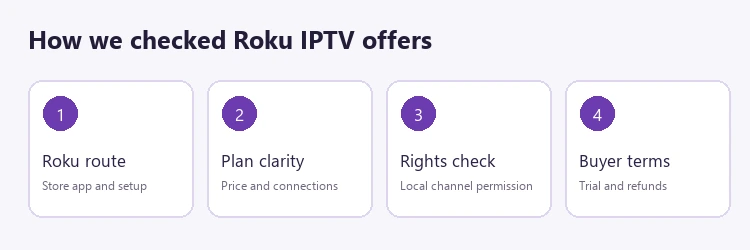
We first checked provider status, unique identity, and the approved destination, then compared official public material about Roku, subscription totals, trials, connections, and refunds. A provider tutorial outranks an unsupported logo, but neither proves successful playback on every Roku model. The ranking weighs how much a buyer can verify before checkout, not unverifiable uptime or picture quality.
I also reviewed Roku support material about installing apps, Store geography, AirPlay, and mirroring to keep software routes distinct. No subscription was purchased, no channel was played, and no rights database was audited. Missing information appears as an explicit question for the provider rather than a guessed feature. Local availability and legal authorization remain purchase conditions.
- Source identity: Match each destination and displayed brand before evaluating its sales claims. Request a written answer.
- Roku method: Distinguish a documented player walkthrough from a device badge or unsupported promise. Confirm before payment.
- Offer clarity: Record full displayed term prices, currency, and connection limits. Confirm the answer before paying anything.
- Policy detail: Read refund exclusions and trial rules alongside promotional headlines. Confirm the answer before paying anything.
- Rights evidence: Do not infer licensed distribution from network logos or catalog totals. Request a written answer.
- Test limits: Describe provider statements accurately without inventing hands on performance findings. Confirm details with support first.
Verdict
For Roku, the decisive factor is a supported player route that works on your model and in your Store region. USA LIVE IPTV provides the clearest published walkthrough in this group, while Tellystudio merely names Roku and the remaining services need a written setup answer. Favor short trials, authorized channels, and clearly documented purchase terms.
- USA LIVE IPTV: Start with its provider supplied Ibo Player Pro tutorial, then check app availability, separate fees, authorized channels, and actual playback.
- Tellystudio: Consider its free one day trial only after support identifies a current Roku player and provides exact login instructions for your region.
- OrigineTV: Its connection tiers are easy to compare, but confirm a working Roku installation before activation because its published refund policy is restrictive.
FAQs
Can an IPTV service be installed directly on Roku?
Only when a suitable app is available through the Roku Store for your device and region. Many IPTV sellers supply credentials for a separate player rather than a provider owned Roku channel. Ask for the exact app name and login format. A generic supported devices graphic does not establish that installation will work.
Does USA LIVE IPTV have a Roku app?
The provider publishes a Roku tutorial using Ibo Player Pro, a third party player. That does not establish a provider owned Roku channel. Confirm the player is in your Store region, any activation charge, and whether the supplied credentials work on your device. Playback was not independently tested for this comparison.
Is Tellystudio supported on Roku?
Its official FAQ names Roku as a viewing device, but the reviewed tutorial index did not show a Roku specific walkthrough. Request the app name, installation sequence, and account format from support before subscribing. Use the advertised short trial on your own Roku and confirm the desired authorized channels appear.
Can an Android IPTV app be sideloaded onto Roku?
Roku does not run ordinary Android APK applications. Its developer mode is documented for app development and testing, not as a routine consumer installation path for an Android service. Use the Roku Store or a documented casting or mirroring method supported by your model. Do not pay based on sideload claims alone.
Does an M3U playlist guarantee Roku compatibility?
No. M3U is an input format, not a promise that a suitable Roku app exists or accepts the provider feed. The provider must supply usable credentials, and the player must be available in your Store region and support that format. Test playback, navigation, and guide data on the target television.
Is screen mirroring the same as a Roku app?
No. Mirroring displays a phone or computer screen on the television, while a Roku app runs on Roku itself. The sending device, network, operating system, and content restrictions can affect mirroring. A subscription usable by mirroring should be described that way, not as a native provider channel. That condition is worth settling before payment.
Are IPTV channel counts evidence of legal rights?
No. A large catalog or familiar network logo does not prove the seller has permission to distribute a channel where you live. Ask for evidence of authorization and check the lineup in your region. Choose lawful sources for the programs you watch, even if a technical player can load an offered stream.
Do IPTV players require another payment?
Some player developers charge activation or subscription fees independently of a content provider. The applicable amount may differ by app and device. Check the player listing and its official terms before comparing provider plan prices. I would include the player cost, subscription total, and likely connection needs in a single budget.
Which subscription length should a new Roku buyer choose?
Use a free trial or the shortest workable paid period after confirming the app and credentials. A longer prepaid plan lowers the advertised monthly equivalent but increases exposure if compatibility, rights, or service quality disappoints. Inspect refund exclusions and renewal terms before purchase, especially where activation ends eligibility. Confirm the answer before paying anything.
What should a buyer ask an IPTV provider before paying?
Ask for the exact Roku Store app, supported model and region, credential type, player fees, trial start time, simultaneous stream allowance, desired channel lineup, distribution rights, and refund conditions. Keep the reply in writing. A service that cannot answer the setup question should not be treated as confirmed Roku compatible.