8 Best IPTV Players for Windows (2026)

Key Takeaway: OrigineTV, OSIRISIPTV, and Tellystudio are subscription services to investigate first if you need a source; the five later entries are Windows player applications for a source you already have permission to use. A service subscription and player software are separate purchases or choices.
Best IPTV Services and Players for Windows: Quick Comparison
- OrigineTV
- OSIRISIPTV
- Tellystudio
- IPTVnator
- Kodi with PVR IPTV Simple Client
- VLC media player
- ProgDVB
- MyIPTV Player
| Tool Name | Type and Best For | Windows Route | Starting Price | Visit Site |
|---|---|---|---|---|
| OrigineTV | Service; documented Windows compatibility | Third-party player and supplied account format | €34.99/three months, one connection | Visit Site |
| OSIRISIPTV | Service; short entry term | PC and advertised M3U | €9.99/month | Visit Site |
| Tellystudio | Service; day-based plans | Computer claim; confirm player/login | $15/30 days | Visit Site |
| IPTVnator | Player; organized playlist sources | Official Windows desktop release | Free | Visit Site |
| Kodi with PVR IPTV Simple Client | Player; configurable TV guide | Native Windows Kodi plus add-on | Free | Visit Site |
| VLC media player | Player; direct network stream | Official Windows installer | Free | Visit Site |
| ProgDVB | Player; desktop TV controls | Official Windows Standard or Pro | Standard free; Pro €25 | Visit Site |
| MyIPTV Player | Player; Store-based M3U/Xtream | Microsoft Store Windows download | Free download; in-app purchases | Visit Site |
Disclaimer
This is informational research, not legal advice or a guarantee of any provider’s licensing, uptime, catalog or refund eligibility. Some links may be affiliate links; the site’s Affiliate Disclaimer explains its policy. Prices, regions, features and terms can change. Use only streams and recordings you are authorized to access in your location; a VPN does not grant viewing rights.
The best IPTV player for Windows depends first on whether you already have an authorized stream or need to evaluate a content service. This comparison separates three subscription providers from five genuine Windows applications. I checked current official device, format and pricing material, but did not buy accounts or measure playback, rights clearance, reliability or support response times.
Start with the source format: an M3U playlist, Xtream-style login, portal or direct network stream is not interchangeable across every app. Then confirm the provider permits your country, channels, devices and concurrent sessions. A polished player cannot supply missing rights or repair an unavailable feed, and a subscription does not automatically license a premium Windows application.
Read More
Why You Can Trust OTTWatchGuide?
We separated source subscriptions from player software, checked current official Windows, format and price documentation, and recorded uncertainty where a vendor’s page did not prove a claim. This is a documentation-based comparison, not a hands-on speed test or a certification of content rights. Individual accounts, streams, regions and devices may behave differently; readers should verify their own exact requirements before payment.
- Source checks: Official provider, project-owner and Microsoft Store pages support each stated product identity and acquisition route.
- Price discipline: Figures come from current official pages, retain original currencies and terms, and are not converted estimates.
- Editorial boundary: A player’s interface is not a channel catalog, and provider advertising is not independent licensing evidence.
1) OrigineTV
OrigineTV provides subscription access rather than a standalone Windows PC application. Its official FAQ explicitly describes using a compatible app and supplied credentials on Windows PC. Manual renewal is another useful distinction for readers who want to review continued service instead of assuming every IPTV plan renews automatically after purchase.
I would confirm the account’s connection allowance and current player instructions before comparing longer subscriptions. The pricing page separates one-connection and two-connection packages, while lifetime wording requires particular caution. Neither a compatible-player claim nor a prepaid term establishes permanent service operation, local channel licensing, or reliable playback on every stream.
Features:
- Player handoff: OrigineTV’s FAQ describes Windows PC access through a compatible application and the credentials provided after subscription. That supports a documented service-to-player workflow, not a proprietary Windows app recommendation. Confirm the permitted application and exact import method with support; a familiar login screen elsewhere does not establish compatibility with every Windows player or format.
- Manual renewal: The FAQ states that subscriptions do not renew automatically and require manual renewal. This can make the decision to continue more deliberate, although an account can still expire if renewal is overlooked. Record the actual expiry date and current renewal instructions, and do not assume a stored player login extends the service entitlement.
- Connection tiers: Published pricing distinguishes one-connection and two-connection plans. Match that allowance to simultaneous household viewing rather than the number of devices on which player software can be installed. Ask about restrictions before using additional screens, because eligible app sharing and a second provider connection are different arrangements with separate account rules and separate charges.
- Account delivery: Official material describes a confirmation email with credentials and a setup guide. Use the verified provider contact if those details do not arrive, and check the purchasing address without exposing it publicly. A delivery promise is not independent proof of successful activation; test the assigned account before assuming the subscription is usable.
- Guide and replay: Guide and catch-up features are advertised, but usable schedules and archives depend on the supplied source and selected player. Ask about the channels you need instead of assuming universal replay. A player may display a previous programme without receiving a working replay stream, so verify both schedule accuracy and one supported archive.
- Support languages: Contact material advertises English and Dutch support, which may help readers who prefer explaining setup problems in those languages. I would ask for the current Windows PC instructions in a language understood comfortably. Stated support availability is not a measured response guarantee, and unclear written account terms should be resolved before payment.
- Long-term caution: A lifetime package is displayed, but that label should not be interpreted as guaranteed indefinite operation or future-device compatibility. Determine what happens if the service changes, closes, or no longer supports your required player. A shorter permitted test and clear written terms are more useful than relying on the longest advertised duration.
| Pros | Cons |
|---|---|
| Official FAQ documents compatible-app access specifically for Windows PC. | Lifetime wording cannot guarantee permanent service operation or compatibility. |
| Manual renewal supports deliberate decisions about continuing the subscription. | No universal current trial or refund window was verified. |
| My shortlist favors checking the clearly separated connection tiers. | Advertised catalogs do not independently establish regional channel licensing. |
| English and Dutch support options may simplify setup discussions. |
Pricing:
- One connection: EUR €34.99/three months, €48.99/six months, €67.99/twelve months with an advertised bonus month, or €99.99 for a lifetime-labeled plan.
- Two connections: €69.99/three months, €97.99/six months, €135.99/twelve months with an advertised bonus month, or €199.99 for a lifetime-labeled plan.
- Renewal is described as manual. Confirm bonus eligibility, expiry, and lifetime service-continuity conditions before ordering.
- No universal current free trial or refund window was verified. A dated event promotion was excluded from the standard pricing comparison. Compatible player software and viewing rights require separate checking.
Link: originetv.com
2) OSIRISIPTV
OSIRISIPTV is a subscription provider advertising M3U access, not a Windows PC application. Its short entry plan may interest readers who prefer testing service suitability before a longer commitment. Windows PC use depends on a compatible, permitted player; references to Apple TV+ programming are not evidence of Windows app support.
My cautious approach would be to request its advertised test account and verify the exact M3U setup before payment. The subscriptions page names PC and M3U, but that does not establish every player’s features or stream. Refund pages conflict, so written terms applicable to activated streaming subscriptions are important here.
Features:
- M3U route: The subscription page advertises M3U access and identifies PC as a supported route. This indicates a possible Windows route through separately installed software rather than a proprietary Windows app. Verify the account-specific playlist and permitted player before ordering; format compatibility alone does not guarantee working authentication, guides, or streams.
- Single connection: The provider says a standard account is limited to one device at a time. Treat that as a practical household constraint, even if the player can retain several sources or display multiple windows. Stop other sessions when troubleshooting access, and ask about an appropriate additional allowance before expecting simultaneous playback on another screen.
- Trial check: A free 24-hour test account is advertised. Use that time to confirm the required Windows workflow, representative permitted streams, and guide behavior, not simply that credentials arrive. Current eligibility and enabled features still need confirmation. A brief successful test does not establish long-term uptime, complete catalog licensing, or future availability of events.
- Guide dependence: An electronic programme guide is advertised alongside the subscription. Correct schedules require usable provider data and compatible player matching, so verify a known programme’s timing before paying. If the video works but guide entries are missing, request the appropriate guide information rather than assuming a premium app purchase will repair incomplete sources.
- Refund uncertainty: Subscription pages advertise a seven-day money-back offer, while FAQ and refund material describe different or generic conditions. This inconsistency prevents a reliable universal refund guarantee. I would request written terms for the actual activated subscription before purchasing, including eligibility, timing, and the responsible billing party, rather than relying on promotional badges.
- Resolution restraint: High-resolution and smooth-playback claims appear in marketing, but they were not independently measured for this comparison. Judge the specific permitted stream on the intended hardware instead. Check encoding, network stability, and television output settings; a provider’s largest advertised resolution cannot make every channel sharper or remove limitations caused by account allowances and playback.
- Support escalation: Official email and messaging contacts provide a route for account and setup questions. Use the verified destination and explain whether the issue affects one stream, the guide, or the entire account. Keep passwords out of public messages, and distinguish a provider-side access failure from an app-specific bug before paying for another subscription.
| Pros | Cons |
|---|---|
| A short monthly entry term limits initial prepaid exposure. | Standard accounts are limited to one device at once. |
| Advertised M3U access supports checking a compatible player workflow. | Conflicting refund material prevents establishing a universal money-back guarantee. |
| My preferred first step is requesting the advertised test. | Windows PC setup needs account-specific confirmation before any payment. |
| Official contacts allow requesting written account and refund conditions. |
Pricing:
- EUR €9.99/month, €24.99/three months, €44.99/six months, €69.99/twelve months, or €99.99/twenty-four months.
- Standard account use is described as one device at a time. Do not assume extra simultaneous connections are included.
- A free 24-hour test and seven-day money-back marketing are displayed. Conflicting FAQ and generic refund-policy wording mean an applicable subscription refund window could not be confirmed.
- Obtain written activation and refund terms before paying. Player software is separate; a named programming package is not proof of Windows app compatibility.
Link: osirisiptv.com
3) Tellystudio
Tellystudio is a content subscription service that lists computers among its supported devices. Its published one-connection plans use specific day counts, which helps distinguish actual billing periods from loosely labeled months. The advertised one-day test can support a setup check, while the Windows player and connection method require separate confirmation.
I would ask support for the current Windows PC workflow and applicable refund conditions before choosing a paid period. This service should not be described as a proprietary Windows app. Its longer and lifetime-labeled packages require caution because prepaid duration, continuing service operation, and player software entitlements are different commitments.
Features:
- Device claim: Tellystudio’s device FAQ explicitly lists a computer. That is a provider compatibility statement, not evidence that Tellystudio publishes its own Windows Store player. Request current instructions, the supported account format, and the permitted application before purchasing; this comparison does not infer a particular login method from unrelated providers.
- Day-based plans: Published periods are expressed as 30, 90, 180, 365, 730, and 1,095 days, alongside a lifetime-labeled offer. These durations make the service term more explicit than a monthly label. Confirm the actual activation date and renewal procedure, and compare the shorter terms before committing money to a longer, uncertain service commitment.
- One connection: The listed plans provide one connection. That allowance should guide household expectations even when player software supports multiple devices or layouts. Verify whether another session must be stopped before switching screens, and ask about additional allowance rather than assuming installing a player on several PCs permits extra provider streams without separate arrangements.
- Trial boundary: A free one-day trial is advertised separately from the paid 30-day plan. Use the trial to check required streams and setup on the intended Windows PC. Confirm its current conditions before ordering; a paid entry subscription is not automatically a refundable trial, and brief access does not establish continuing rights or channel reliability.
- Refund conditions: The refund policy describes full-refund eligibility within three days with conditions, including exclusions for trial orders and troubleshooting requirements. It also describes possible partial refunds later. I would obtain the applicable terms before paying, especially the activation date and required support steps, rather than interpreting the headline window as an unconditional guarantee.
- Guide and catalog: Live, on-demand, and guide features are advertised, but the individual required programmes and correct guide timing should be checked through permitted access. Do not treat a large catalog count as verified licensing or a promise of particular event availability. Player-side navigation can improve organization without changing the provider’s content rights or quality.
- Separate purchases: A provider subscription pays for the stated service arrangement, while a premium Windows PC player may introduce another charge. Record the billing party and cancellation process for each purchase. Paying Tellystudio cannot automatically unlock separately priced player software, and a player software receipt is not proof of payment for subscriptions.
| Pros | Cons |
|---|---|
| Published day counts clarify the duration of paid plans. | Listed subscriptions include only one connection for simultaneous viewing. |
| Computers are explicitly named in device compatibility material. | Player choice and account format require confirmation before purchasing. |
| My first check would use the advertised one-day trial. | Refund eligibility includes conditions rather than an unconditional guarantee. |
| Written refund material provides conditions to discuss before ordering. |
Pricing:
- USD $15/30 days, $35/90 days, $65/180 days, $95/365 days, $165/730 days, $235/1,095 days, or $365 for a lifetime-labeled plan. Listed plans include one connection.
- A free one-day trial is advertised; it is separate from the paid 30-day subscription.
- The policy describes full-refund eligibility within three days, excludes trial orders, and includes technical-resolution conditions. Possible later partial refunds depend on the remaining term and applicable conditions; approval is not unconditional.
- Confirm the actual Windows PC setup, activation date, lifetime conditions, and separate app costs before payment.
Link: tellystudio.com
4) IPTVnator
IPTVnator is a Windows application for organizing a source that you have permission to use. It documents M3U and M3U8 playlists, Xtream and Stalker connections, and XMLTV guide data. Unlike preceding subscriptions, it provides no channels or playlists. That distinction makes it useful for comparing interfaces without purchasing a catalog.
I would start with the project release, then check which login or playlist format an authorized source supplies. The embedded MPV path is experimental on Windows; external playback and browser formats can behave differently. A successful import is not a rights check, and a screenshot cannot establish your provider’s availability.
Features:
- Windows release: The project owner publishes Windows setup assets alongside desktop packages in its release. Get the installer from the repository rather than a site selling an unrelated subscription under the same name. Check release notes and architecture; a download’s presence does not prove every codec or stream works on your PC.
- Source formats: IPTVnator documents local or remote M3U and M3U8 imports, plus Xtream and Stalker connections. Those are alternative account routes, not a promise that a particular provider permits all three. Ask for the format your subscription actually authorizes, store credentials carefully, and avoid pasting them into unknown web forms or forum posts.
- Guide data: XMLTV information can be supplied by URL and shown in the application’s guide. A readable guide still depends on valid feed data and matching channel identifiers. If listings are blank or offset, inspect the source’s time zone and identifiers before blaming playback; guide availability never guarantees a replayable past programme.
- Playback choices: The project describes HTML5 playback, external players and an embedded MPV option on Windows that remains experimental. I would test a permitted sample in the default mode, then compare the documented alternatives only if needed. A codec or server error may be source-specific, and a player switch cannot unlock DRM-protected content without entitlement.
- Desktop updates: Current project notes describe a desktop updater using official releases. Confirm the installed version and update channel before changing an important working configuration. Experimental or nightly builds can be less predictable than stable releases; back up local playlist settings when possible, and never assume an update preserves every imported source or playback preference.
- Content boundary: The project explicitly states that it supplies no playlists, subscriptions or channels. Screenshots illustrate navigation rather than included viewing rights. Bring only a lawful source, confirm territory and concurrent-connection terms, and do not buy purported IPTVnator activation packages from lookalike sellers. Free software and free content are entirely different propositions.
- Privacy checks: Importing remote URLs or account details can expose tokens to the application and connected provider; optional metadata matching may involve another service. Review current project settings and source policy before enabling enrichment or syncing. Open source permits inspection, but it does not mean every third-party stream, server or imported playlist handles data safely.
| Pros | Cons |
|---|---|
| Official Windows builds make source import readily accessible. | Embedded Windows MPV remains an experimental playback option. |
| Supports several documented playlist and provider login formats. | No channels or playlists are supplied with installation. |
| My preference is its explicit separation of player and content. | Source behavior varies with codecs and account permissions. |
| XMLTV guide support can organize a valid schedule feed. |
Pricing:
- Free open-source desktop player. There is no official IPTVnator subscription, channel package or required paid activation.
- Any authorized content subscription, connectivity or optional external service is separate; confirm its own terms and price.
Link: github.com
5) Kodi with PVR IPTV Simple Client
Kodi is a Windows media center; PVR IPTV Simple Client is its add-on for a supplied M3U source and XMLTV guide. That combination is best for readers who want a configurable television interface. Neither Kodi nor its add-on gives you a licensed channel subscription merely because the live-TV menu appears.
I would choose Kodi only if setting up an add-on and matching guide data sounds worthwhile. Install Kodi from its Windows download, enable the PVR client, and enter your permitted source details. Add-on configuration is involved compared with opening one stream, and a provider may not support the playlist format.
Features:
- Native desktop app: Kodi’s download page identifies Windows as a supported operating system. Install a stable build from that source, then check architecture and operating system on the download page. Its television-oriented interface may suit a living-room PC, but official Windows support alone does not guarantee every remote or graphics setup behaves identically.
- PVR add-on: The official Kodi wiki documents PVR IPTV Simple Client as the component that accepts M3U live-TV playlists. Enable and configure that add-on instead of assuming a blank Kodi installation carries channels. A source subscription remains separate; use a playlist only when its owner permits the device, location and intended viewing.
- Guide mapping: The add-on supports XMLTV programme data, provided independently of the player. Match the EPG’s channel identifiers and time zone to the M3U entries before evaluating missing schedules. I would correct source data first, because a polished guide layout cannot create listings that a provider never supplied or update a stale feed.
- Media center scope: Kodi also organizes local and network media, so its value extends beyond one live playlist. That breadth creates a more complex setup than a lightweight stream opener. Keep other add-ons out of a basic IPTV comparison unless their maintainer, permissions, rights and update status have been checked separately.
- Playback limits: A visible channel in the list may still fail because a stream has expired, a codec is unsupported, a token changed or the account reached its connection limit. Compare one authorized URL against the provider’s instructions. Do not interpret a plugin menu or imported artwork as proof that every advertised programme can play.
- Configuration care: Back up the add-on settings and keep the current official Kodi release before a major change. Credential-bearing URLs should not be shared in screenshots or public logs. A second Windows user profile or household device does not automatically expand the subscription’s simultaneous-stream allowance; that policy belongs to the source provider.
- Rights distinction: The Kodi Foundation supplies software, not rights to subscription television. Publicly reachable playlists can still contain restricted channels or copyrighted streams. Verify each source’s authorization, geography and recording terms. A VPN may protect some network traffic but cannot convert an unlicensed feed into a lawful one for viewing.
| Pros | Cons |
|---|---|
| Official Windows build supports a configurable media center. | Add-on and guide mapping require more setup effort. |
| M3U and XMLTV support are documented by Kodi. | No subscription or licensed channels arrive with Kodi. |
| My preference is its flexible living-room style navigation. | Provider format differences can prevent a straightforward import. |
| Local media and permitted live streams share one interface. |
Pricing:
- Kodi and the official PVR IPTV Simple Client add-on are free and open source. No channel plan is included.
- A lawful source, network service or hardware is a separate expense; confirm its price and terms with its provider.
Link: kodi.tv
6) VLC media player
VLC is a free Windows multimedia player that accepts network streams and local media. It makes sense when you have an authorized playlist or stream URL and want a familiar playback tool. It is not an IPTV subscription and lacks the source-management emphasis of the guide-oriented applications in this list.
I would use VLC to establish whether a permitted stream plays before paying for another interface. VideoLAN offers Windows installers, including architectures on its download page. Opening a URL does not verify licensing or provider privacy practices; intermittent playback can reflect the source, network or format rather than VLC alone.
Features:
- Official Windows installer: VideoLAN’s current download page lists Windows packages and the 3.0.23 release. Choose the matching architecture from the official site instead of a repackaged installer or advertised channel bundle. The software is free; a page asking for a VLC subscription should be treated separately and not confused with the actual player.
- Network playback: VLC supports several streaming protocols and can open a direct network location or compatible playlist. That flexibility is useful for a provider-supplied, authorized URL but does not imply Xtream portal management or an integrated subscription catalog. Confirm the link’s format and expiry with its owner before diagnosing a player failure.
- Format range: The official description covers a wide range of media files and streaming protocols without extra codec packs for many common cases. Specific encrypted, DRM-protected or unusual sources can still require a permitted compatible application. I would test one representative feed; a generic format claim cannot prove every channel in a vendor’s list works.
- Simple diagnostics: A direct stream opener helps distinguish an inaccessible source from a complex guide configuration. If the same authorized link fails in multiple players, check the provider’s service and account terms before changing software. Do not publish token-bearing URLs in support forums, and avoid sharing screenshots that reveal private account details.
- Interface tradeoff: VLC excels at playing media rather than maintaining a television-focused grid with polished programme discovery. A dedicated IPTV application may organize favorites, guide data and several accounts more conveniently. That distinction is about workflow, not video quality: either player remains dependent on source encoding, rights, bandwidth and hardware support.
- Free license: VideoLAN identifies VLC as free and open source, so there is no official premium playback tier to unlock. Donations to the nonprofit are distinct from purchasing channels. Installing the player does not create a viewing entitlement, add simultaneous connections or waive a broadcaster’s geographic conditions; treat those as source-specific questions.
- Privacy boundary: VLC’s official distribution avoids an unknown reseller package, but a network stream can still contact its host and expose normal connection information. Review the source and its policy before pasting a private link. Privacy tools are not licenses, and a free player does not independently vet every playlist.
| Pros | Cons |
|---|---|
| Official Windows packages and free licensing are clear. | No bundled television subscription or program guide service. |
| Direct network playback handles many authorized stream formats. | Less focused on organized IPTV catalogs than rivals. |
| My initial source check can start without another purchase. | DRM or account restrictions can prevent stream playback. |
| Familiar local media functions extend beyond IPTV use. |
Pricing:
- Free, open-source Windows player. No official paid VLC tier or channel subscription is included.
- A separate authorized source may have its own charge, usage limits and territory rules.
Link: videolan.org
7) ProgDVB
ProgDVB offers Windows desktop software for digital television, including IPTV and internet-TV sources. Its download page distinguishes a free Standard edition from Professional builds with paid features. It suits traditional desktop TV controls, provided a lawful source matches the supported input and desired functions are available in the chosen edition.
I would install the Standard build first and compare the edition table before buying Pro. The website lists Windows packages and a .NET requirement, while a compatibility line names earlier Windows versions rather than certifying every Windows 11 configuration. Trial time and upgrade pricing should be confirmed on the checkout.
Features:
- Windows editions: The vendor lists current x64 and x86 Windows packages for Standard and Professional. Check architecture, .NET requirements and current version on the download page before installation. I would begin with the official Standard installer; a third-party bundle can add unrelated software, while a vendor version number does not ensure every PC is compatible.
- IPTV input: The official comparison includes IPTV, internet TV and OTT among supported source categories. That describes software capability, not an included broadcaster license. Confirm whether the authorized service gives an input ProgDVB can accept, then test a permitted channel; a playlist format label does not establish entitlement or a working network path.
- Free Standard: The vendor says basic ProgDVB functionality is available free without restriction in the Standard edition. Compare the exact feature matrix for recording, guide, decoder and interface needs before expecting a Pro-only feature. Free here refers to application use, not a paid subscription’s channels, service support or concurrent viewing rights.
- Paid Professional: The official order page displays a €25 ProgDVB Professional purchase and €35 combined ProgDVB Pro plus ProgTV Pro option. Those are software prices in euros, not monthly content access. Check current license generation, tax and checkout conditions before paying; a Pro receipt cannot activate a third-party provider’s account.
- Trial terms: The vendor download page describes a 21-day shareware trial while Standard remains free. Verify which Professional features are available during that window and whether an activation key is required. A short software trial cannot evaluate a source subscription unless you separately hold legitimate access and appropriate permission to test its streams.
- Desktop complexity: ProgDVB’s classic interface may appeal to keyboard-and-mouse users more than a couch-first app. It can also demand more configuration and a compatible decoder or input than a simple VLC link. Compare the actual workflow on your machine rather than treating a feature-table checkmark as proof of effortless installation or playback.
- System caveat: Its published requirements mention Windows 7, 8 and 10 and .NET 4.7.2 or higher. The current installer may run elsewhere, but this guide does not claim verified Windows 11 testing. Confirm support with the vendor and keep an installer rollback route before depending on the application for a critical live event.
| Pros | Cons |
|---|---|
| Free Standard edition offers an official Windows entry. | Published requirement text does not expressly certify Windows eleven. |
| Paid Pro prices are displayed in euros officially. | Feature matrix and setup may require careful comparison. |
| My first step is testing Standard with authorized input. | Software purchase never includes a content subscription license. |
| IPTV and internet television appear in vendor documentation. |
Pricing:
- Standard: free for basic functions. Professional shareware: 21-day trial as described on the vendor download page.
- ProgDVB Professional: €25 software purchase; combined ProgDVB Pro and ProgTV Pro: €35. Verify taxes, license scope and current checkout terms. No channels included.
Link: progdvb.com
8) MyIPTV Player
MyIPTV Player is a Windows application published by Vbfnet Apps in the Microsoft Store. Its listing describes local and remote M3U playlists, Xtream logins and a programme guide. It expressly says that it supplies no channels or URLs, making it a player option for users who hold an authorized source.
I would use the Store listing to confirm the publisher and examine purchases before committing to a feature. The listing names catch-up, favorites and PIN controls, but their usefulness depends on source data and account permissions. A free download label does not establish that every advanced capability remains permanently free.
Features:
- Store identity: The Microsoft Store page identifies MyIPTV Player and Vbfnet Apps, with a Windows Download action. Use that listing rather than an unrelated similarly named app or copied APK. Check the Store’s current region and system requirements on your device; a listing visible in the US does not guarantee identical availability elsewhere.
- Playlist import: Its official description accepts an M3U playlist from local storage or a remote source, plus Xtream account details. Confirm the provider authorizes that format before entering credentials. I would avoid untrusted playlists that contain private tokens or unfamiliar hosts; successful import only shows data was parsed, not that streams are permitted.
- Guide and grouping: The Store listing describes built-in EPG, channel grouping and filters. These controls can reduce browsing friction when the source carries coherent metadata. A blank guide may be an invalid feed or mismatched identifier, not a paid-feature failure. Verify current programme information against an authorized channel before trusting scheduled events.
- Playback formats: HLS and MPEG transport streams are named on the listing, with media-engine choices that may use VLC libraries or Windows playback. Compatibility still depends on codec, authentication and provider delivery. Do not interpret one working channel as universal coverage; compare another representative authorized stream and ask the source owner about unsupported formats.
- Catch-up limits: The description advertises Xtream catch-up, saved channels and VOD download management. Actual replay and downloading must be enabled by the source and permitted under its terms. An interface button cannot create an archive or license a copy. Check expiry, territory and storage rules before relying on offline access.
- Purchase label: The Store page offers a free download and displays an In-App Purchases badge, but did not expose an itemized price in the inspected listing. Confirm any purchase prompt and whether the needed function requires payment before proceeding. Do not confuse a software purchase with a separate provider subscription or assume a trial exists.
- Content disclaimer: The publisher expressly disclaims supplying channels and URLs or affiliation with IPTV operators. That separation is helpful, but it is not a review of imported providers’ rights or privacy. Keep account secrets private, inspect permissions and current policy, and use only sources for which you hold appropriate access.
| Pros | Cons |
|---|---|
| Official Microsoft Store listing clearly identifies the publisher. | In-app purchase amounts are not publicly itemized here. |
| Supports both M3U playlists and Xtream account input. | No channels or streaming URLs come with installation. |
| My choice would depend on source and guide compatibility. | Source permissions still govern catch-up and downloaded copies. |
| Built-in grouping and favorites help organize valid channels. |
Pricing:
- Free Microsoft Store download with in-app purchases indicated. Specific current in-app prices are not publicly listed in the inspected official page.
- A lawful channel/source subscription, if needed, is separate. Confirm the Store purchase screen before paying.
Link: apps.microsoft.com
How to Match a Windows Player to an Authorized Source
Begin with the information the source actually supplies. An M3U URL or file is different from an Xtream login, and a portal address may need a particular client. A direct stream can play in VLC while a guide-oriented app needs additional playlist and XMLTV data. Ask the source owner which import method and device are permitted before purchasing software.
Then check the rights and practical limits attached to that source. A player may display a channel title even after a token expires or a regional rule blocks playback. Count concurrent sessions, including other household screens. Do not post URLs containing credentials in troubleshooting forums. If authorization is unclear, use an official broadcaster or properly licensed alternative rather than guessing.
- M3U source: Check whether the permitted file or URL contains actual stream addresses and valid channel metadata.
- Xtream account: Confirm host, username and password through the provider’s secure instructions, never an unrelated activation website.
- Guide data: Match XMLTV identifiers and time zone before treating missing programme entries as a player defect.
- Connection limit: Count simultaneous sessions across devices; installing software on several PCs does not increase a subscription allowance.
- Region check: Verify the intended channels’ licensed country and account location, not merely whether a URL opens.
- DRM boundary: Use the rights holder’s approved application when protected streams cannot be played in a general-purpose client.
What Should You Check Before Paying for IPTV on a PC?
Separate a provider bill from a software purchase. OrigineTV, OSIRISIPTV and Tellystudio sell access arrangements described on their own pages; the five later applications are player software. Compare the first usable term, connection count, cancellation and refund language in the original currency. A lifetime label is not a guarantee of an indefinite service or future channel rights.
Request the current Windows instructions and a sample of the exact authorized source format before committing to a long subscription. Trial offers can change and may exclude refunds after activation. Marketing claims about huge catalogs, particular sports or uninterrupted 4K do not establish licensing or measured performance. I would start with the shortest suitable term and keep written terms.
- Source rights: Ask the provider to substantiate distribution permission for channels you intend to watch in your territory.
- Short term: Test an affordable permitted period before paying for a long or lifetime-labeled arrangement.
- Refund text: Read exceptions, activation rules and dispute route; a headline window may be conditional.
- Player fee: Check whether software is free, one-time paid, or carries in-app purchases separate from channels.
- Connection allowance: A household’s second screen may need another stream even when both devices share software.
- Checkout currency: Retain euros or dollars as displayed and confirm taxes or conversion at the payment step.
How to Troubleshoot Windows IPTV Playback and Guides
Start with a known authorized channel, a current source link and the correct account format. If import fails, check whether the app expects a playlist file, remote URL or credentials; do not repeatedly enter private data into unknown sites. If import succeeds but video does not, compare the source’s support notice, network connection and permitted session count.
Treat guide, video and archive failures as separate symptoms. XMLTV may be present but mismatched to the playlist; a guide’s old programme tile does not guarantee catch-up rights. Playback can fail through expired tokens, unsupported codecs or provider-side restrictions. Record the app version and a redacted error for support, avoiding a public credential or complete playlist URL.
- Blank list: Verify the supplied import type, URL validity and current account entitlement before switching applications.
- Black video: Compare another permitted channel and the source’s own status, then review supported playback formats.
- Wrong guide time: Check XMLTV identifiers, local time zone and provider updates before changing device clocks.
- Missing replay: Confirm an archive entitlement and window with the broadcaster or source, not merely an icon.
- Stream limit: Close other sessions and compare the paid connection allowance before attributing denial to Windows.
- Safe support: Share versions and redacted errors, never passwords, tokenized URLs or screenshots exposing payment details.
How Did We Evaluate These Windows IPTV Services and Players?
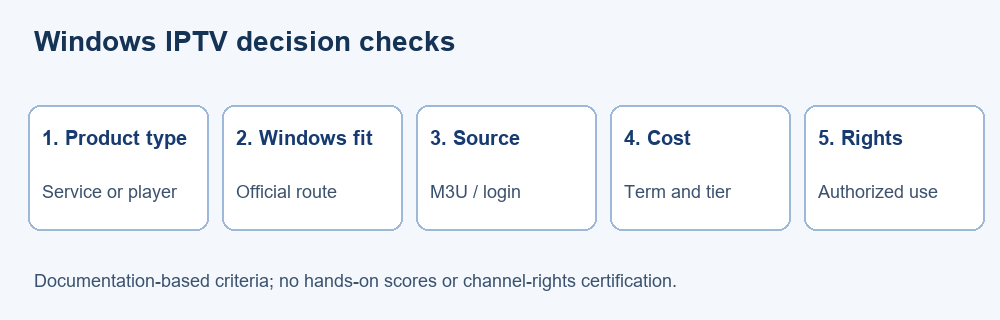
The ranking begins with three current source services that document PC or computer use and an applicable route, followed by five Windows applications. We consulted the providers’ own terms and product pages, the project owners’ Windows downloads and documentation, and the live Microsoft Store listing. We did not purchase access, install the apps or claim measured buffering and support performance.
The comparison emphasizes verified identity, import format, transparent official pricing, connection limits and legal-source boundaries. Unknown rights, privacy specifics or premium prices remain unknown. A service with a large advertised catalog is not automatically preferable to a smaller lawful source; an elegant player cannot correct an unauthorized feed. This is a research shortlist for an informed personal check.
- Identity: Match the service or app to its current official destination and distinguish similarly named products.
- Windows fit: Require a documented PC route, Windows installer or Store listing rather than a mobile-only claim.
- Source compatibility: Compare M3U, XMLTV, Xtream and direct streams without presuming universal interchangeability across products.
- Price context: Read original currency, billing term, connections, trial limitations and separate application purchase costs.
- Permission: Separate a player’s technical ability from the right to distribute, watch or record each channel.
- Uncertainty: We flag untested reliability, unclear rights and unavailable prices instead of inventing scores or experiences.
Verdict
For someone seeking a Windows source, the first three services warrant a conditional comparison of format, written rights, price and connection limits. For someone who already has an authorized feed, IPTVnator offers dedicated source organization, Kodi offers a configurable TV interface, and VLC is the simplest direct-stream check. No listing here certifies a catalog’s licensing or measured performance.
- OrigineTV: Best for comparing a documented Windows-compatible subscription with one- and two-connection tiers; verify rights, player instructions and lifetime terms before payment.
- OSIRISIPTV: Best for a shorter paid entry period and advertised PC/M3U route; reconcile conflicting refund wording and test permitted streams first.
- Tellystudio: Best for comparing explicit day-based terms and an advertised one-day test; confirm computer setup, content rights and conditional refund eligibility.
FAQs
Does an IPTV player for Windows include channels?
Usually not. IPTVnator explicitly says it supplies no channels or playlists; the MyIPTV Store listing says the same. Kodi, VLC and ProgDVB are software, not content entitlements. You need a separate source you are authorized to access. Confirm its format, geographic rights and connection limits before importing it into any player.
What is the difference between a provider and a player?
A provider arranges access to a source or subscription under its terms; a player opens a compatible source on your device. The three service entries are not native Windows player applications, and the five applications do not sell those providers’ subscriptions. Paying one party does not automatically unlock the other product or create rights to a channel.
Does an M3U playlist work in every Windows application here?
No. IPTVnator, Kodi’s PVR client and MyIPTV document M3U imports, while VLC can open compatible network sources. ProgDVB documents IPTV capabilities, but the exact input and edition need confirmation. A playlist can also use authentication or codecs a particular app cannot handle. Confirm both the source format and its permitted player before relying on it.
Is Xtream login the same thing as M3U?
No. They are different ways an authorized service may provide access. IPTVnator and MyIPTV describe Xtream support, while Kodi’s named PVR Simple Client is documented around M3U and XMLTV. Do not convert or share credentials through an unfamiliar website. Ask your provider which method is available, allowed and current for your Windows device.
Which of these Windows players is free?
IPTVnator, Kodi with its official PVR client, and VLC are free open-source software. ProgDVB has a free Standard edition and paid Professional software. MyIPTV offers a free Store download with in-app purchases indicated, but their current itemized price was not publicly listed in the inspected page. None of those free installs includes a licensed subscription.
How much does a Windows IPTV service cost?
The service examples display prices in their own currencies and terms: OSIRISIPTV starts at €9.99 for a month, Tellystudio at $15 for 30 days, and OrigineTV at €34.99 for three months with one connection. These are provider-advertised amounts, not a rights or reliability guarantee. Recheck taxes, trials and current checkout terms directly.
Does a VPN make an IPTV stream legal?
No. A VPN can affect the privacy of some network traffic, but it does not grant a distributor rights or a viewer permission to watch restricted content. Country, broadcaster, channel and account rules still apply. Use official or properly licensed sources, and verify what your subscription permits rather than equating technical accessibility with authorization.
Why is the programme guide blank or inaccurate?
The app may lack an XMLTV feed, or its channel identifiers and time zone may not match your playlist. Check the provider’s current guide address and a known programme against its official schedule. A premium app purchase cannot generate missing source data. I would troubleshoot the feed and mapping before replacing a working player.
Can viewers record or download a stream in these applications?
Some descriptions mention catch-up or downloads, but an available control is not permission to make a copy. Rights and feature support depend on the broadcaster, subscription, region and exact application edition. Confirm the provider’s recording terms and retention window before use. A guide entry or VOD tile may not carry an accessible replay file.
What if a provider works on a phone but not Windows?
Request its current PC instructions and exact allowed input format. Mobile support does not establish a Windows installer, and a direct URL may behave differently from an app login. Check device, account, codec and concurrent-session rules. If the source only authorizes its own app, use that approved path or choose another properly licensed source.
Should viewers buy a lifetime IPTV subscription?
Treat lifetime as the seller’s plan label, not a guarantee that a business, app, server or channel right will remain available forever. Read service-continuity and refund conditions in writing. A shorter paid term or legitimate trial can expose format and support problems with less prepaid risk, though even a successful test cannot predict future performance.
How can users protect IPTV account details?
Use official installers and Store listings, keep apps updated, and do not post playlist URLs that contain tokens. Inspect an app’s current permissions and privacy policy, especially before optional metadata syncing or downloading. Send support only redacted errors and account identifiers they actually need. This reduces exposure but does not certify any provider’s security or lawful catalog.